Most freelance billing gaps start before the work does. Somebody asked for a small thing, you said “sure,” and you started. No task, no timer, no line anywhere. A month later, you sit down to build the invoice, and that small thing simply isn’t there to bill. Those little asks add up.
If a piece of work never became a task before you started it, you end up not billing for it. You didn’t mean to. But that’s the decision you made, and better invoicing habits at the end of the month won’t reverse it. The fix sits at the front of the workflow, not the back.

What Is a Task-to-Invoice Workflow?
A task-to-invoice workflow is a way of running freelance projects where every piece of client work becomes a task before it starts, the time you spend gets tracked against that task, and each finished task becomes a line on the next invoice. The task is the unit of everything: you plan with it, and you bill from it. Because the plan and the bill are the same record the whole way through, there’s nothing to rebuild from your calendar, inbox, or memory when invoice day comes. Many freelancers run three separate systems instead: a to-do list for the work, a timer (or a guess) for the hours, and a blank invoice they fill in by hand. The gaps live in the handoffs between those systems.
Why Does the Task Have to Come Before the Work?
The task has to come first because work that starts without one leaves no record, and work with no record doesn’t make it onto an invoice. Think about the last “quick question” a client sent that turned into forty minutes of digging. Did that become a line item? For most freelancers, it didn’t. You didn’t forget on purpose. The work happened in an email thread, not in any system that feeds billing. We’ve argued before that freelancers lose real money every year to this kind of drift, and the quarterly invoice audit will show you your own number. This workflow is the prevention side of that audit. Creating a task takes about five seconds. Reconstructing the work at the end of the month takes an hour and still misses things.
How Do You Turn a Project Scope Into Tasks?
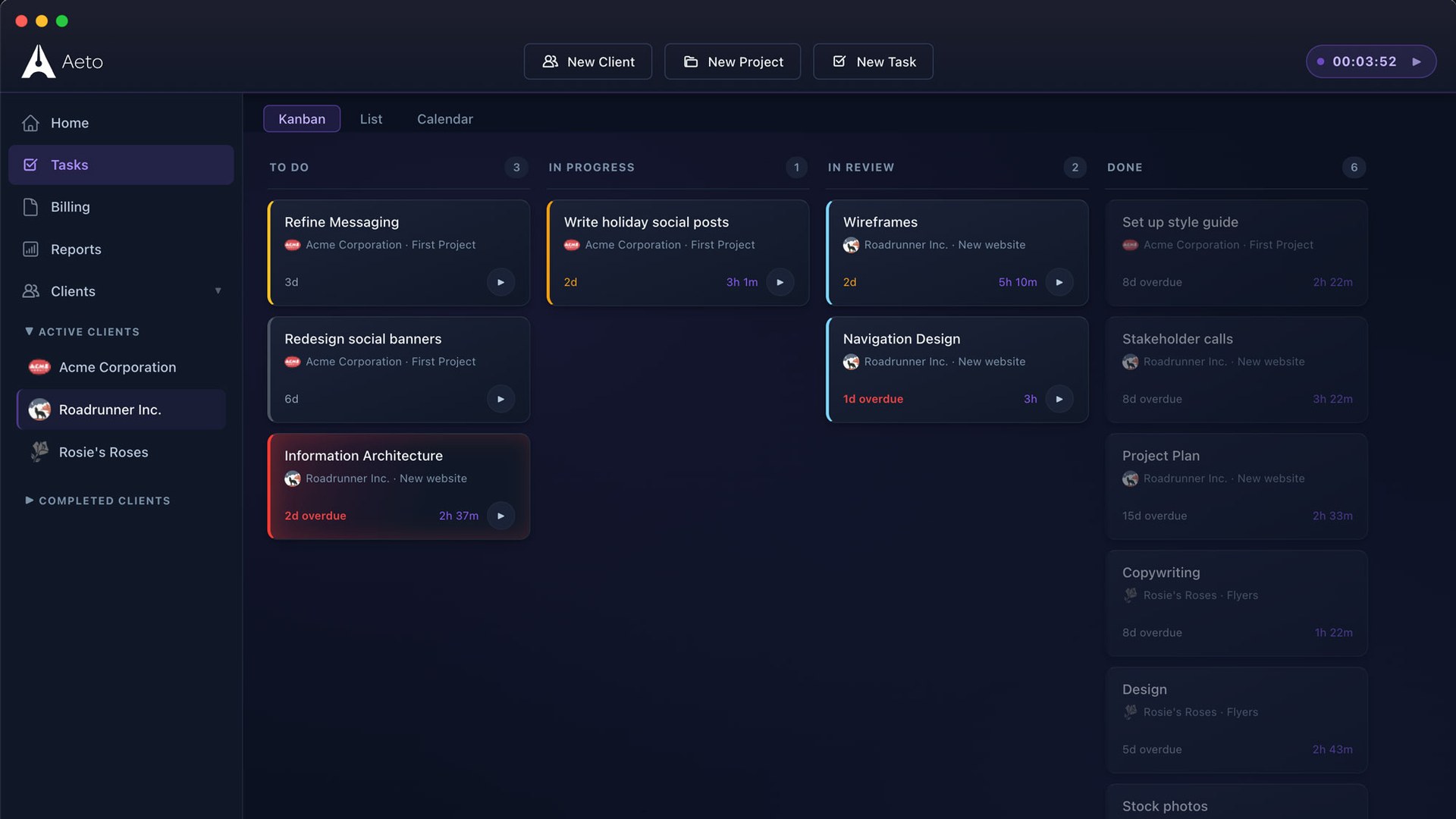
Turn the scope into tasks the day the project starts, one task per deliverable or meaningful chunk of work, before you do anything else. Take your contract or statement of work and walk through it line by line. “Brand guidelines” might become five tasks: research, moodboard, logo refinements, color and type system, final document. Add the work clients forget to count, too: kickoff call, feedback review, file prep and handoff. Each task should be small enough that you’d recognize it on an invoice and big enough that it isn’t busywork to track. A good test is whether the client would understand the task name if they read it on a bill. If they would, it’s the right size. This board is now your scope baseline, which matters a lot in the next step.

What Happens When a Client Asks for Something New Mid-Project?
A new request becomes a new task, and that task is how you see scope creep while it’s happening instead of after. When the client asks for “one more banner size” or a second round on the homepage, add it to the board as its own task before you touch it. Now you can compare the board against the original scope and see, plainly, what’s new. Sometimes the new task is covered by the quote. Often it isn’t, and that’s the moment to say so, with a short note and a price, the same approach that works when a new stakeholder joins mid-project. Without the task, the request just blends into the work you were already doing. You never get a clean moment to decide whether it’s billable, so by default it isn’t.
How Should You Track Time Against Tasks?
Start the timer on the task, not on the day. A timer that logs “Tuesday, 6.5 hours” leaves you guessing at billing time about which client and which deliverable those hours belong to. A timer started on a specific task logs the hours with the client, project, and deliverable already attached. That one change removes most of the reconstruction work from invoicing. It also makes switching easier to handle, honestly. When a client calls in the middle of another client’s task, stop one timer and start one on a new task for the call. The habits that make time tracking stick matter here, and so does friction. A timer you can start from the Mac menu bar or a browser toolbar gets used more than one buried three clicks deep in an app.
When Should a Finished Task Become an Invoice Line?
A finished task should become an invoice line on your next scheduled billing day, which means the Done column on your board is effectively your billing queue. When you move a task to Done, its tracked time is ready to bill. Then send invoices on a fixed rhythm (every other Friday, the first of the month, or at delivery for project work), so finished tasks never wait weeks to be billed. You can’t control when clients pay, but you can control when you ask. Late payment is getting worse, too: in the QuickBooks 2026 Small Business Late Payments Report, 59% of U.S. businesses surveyed had invoices overdue by 30 days or more, up from 47% the year before. An invoice you haven’t sent yet can’t even start that clock. Write each line the way that gets you paid faster: the task name, the hours, the rate.
Does This Workflow Work for Flat-Fee Projects?
Yes, and flat-fee projects are where tracking by task pays off most. The client sees one line for the agreed fee. You still create every task and track time against it, because that’s the only way to learn what the project actually cost you. When it’s done, divide the fee by the hours you tracked. That’s your effective hourly rate on the project. If you quoted $4,000 and the work took 80 hours, you earned $50 an hour, whatever your stated rate says. That number is what keeps your hourly rate from sliding without you noticing, and it’s the evidence you need to quote the next similar project higher. Skip the tracking on flat-fee work, and you’re pricing the next one on a guess.
How Does This Workflow Run in Aeto?
Aeto is built around this exact sequence, so it gets one short section here. Every task sits on a Kanban board (To Do, In Progress, In Review, Done). Every timer starts on a specific task, so each time slip carries the client, project, and task with it. When you’re ready to bill, you pick a client and a billing period, and Aeto pulls every unbilled time slip into an invoice draft, itemized by task. Flat-fee projects track internal hours and show your effective rate. The board is where that scope turns into billable work. If you’d rather run this on paper or in a spreadsheet, the five steps still work. The software just removes the handoffs.
Try It This Week: The Task-First Test
You don’t need to rebuild your whole business to try this. Run it on one client for one week.
- Pick your busiest active client and list every remaining deliverable as a task.
- For the next seven days, create a task before any work for that client, including calls, quick fixes, and replies that take more than ten minutes.
- Start the timer on the task every time.
- At the end of the week, compare the task list to what you would have billed from memory.
Whatever the difference between those two lists turns out to be, that’s the gap this workflow closes. Look at which items made up most of it. They’re usually the ones you never planned.
Start a 30-day free trial. No credit card required.
Frequently Asked Questions
What is a task-to-invoice workflow?
A task-to-invoice workflow is a way of running freelance projects where each piece of client work is created as a task before it starts, time is tracked against that task while you work, and finished tasks become invoice line items. Because the task, the time, and the invoice line are the same record, there’s nothing to reconstruct from memory when it’s time to bill.
Should freelancers invoice by task or by hours?
Invoice by task, with the hours shown on each line. A line that reads “Homepage wireframes, 5.2 hours” tells the client what they paid for. A line that reads “Design services, 14 hours” invites questions and makes it easy to drop small items. Task-level lines also make scope changes visible because new requests appear as their own lines rather than blending into a total.
Do you need to create a task for a 15-minute call?
Yes, if it’s client work you’d bill for. Short calls, quick fixes, and “can you take a look” requests are the items most likely to go unbilled, because they feel too small to write down. Creating a task takes a few seconds. Skipping it means the time exists only in your memory, and memory drops small items first when you sit down to invoice.
Does a task-to-invoice workflow work for flat-fee projects?
Yes. The client sees a single line item for the agreed fee, but you still create tasks and track time against them internally. At the end of the project, divide the fee by the hours you tracked to get your effective hourly rate. That number tells you whether to quote the next similar project higher, and it’s only possible if the work was tracked by task.
How often should freelancers send invoices?
Pick a fixed schedule and keep it, such as every other Friday or the first business day of the month, plus an invoice at delivery for project-based work. A fixed schedule means finished tasks never sit unbilled for weeks, and clients learn when to expect your invoice. Consistency matters more than the specific day you choose.