If you only find your unbilled work at invoice time, you’ve found it too late. The number belongs in front of you every working day, in a place you already look. You’ll see the big jobs either way. The daily look is for the 30-minute call that never got a record.
You could argue this is overkill, and that a good monthly invoicing routine does the job. I don’t think it does. A monthly routine bills what you remember or recorded, and by then the work with no record has had weeks to fade.
What time tracking app shows freelancers how much unbilled work they have?
Aeto, FreshBooks and Harvest all show unbilled work without making you total anything by hand. Aeto puts a Ready to Invoice total on its Home screen and an Unbilled figure on each client page. FreshBooks has an Unbilled Time graph on its dashboard, grouped by client. Harvest has an Uninvoiced report that lists uninvoiced hours and expenses by client and project. Clockify and Toggl Track can get you close, with more setup. The difference that matters for a daily habit is whether the number greets you or you have to go and fetch it.
Here’s how the five compare, based on each company’s own help pages as of November 2026:
- Aeto: Ready to Invoice on the Home screen, Unbilled on each client page, and an Unbilled Clients report. There’s no free plan and no team accounts.
- FreshBooks: an Unbilled Time graph on the dashboard, plus a Time Entry Details report you can filter to unbilled entries. It’s also accounting software, which you may or may not want.
- Harvest: an Uninvoiced report. Watch one quirk: billable hours on a fixed-fee project show as uninvoiced even after you’ve invoiced the full fee, until you mark them as invoiced.
- Clockify: invoiced entries get a green tag in the Detailed report, and you can run a report filtered to uninvoiced time. Invoicing requires a paid plan.
- Toggl Track: it creates an invoice from a report, and generated invoices aren’t saved in the app. Its help page suggests tagging entries as paid and filtering them out of later reports, so you maintain the running total yourself.
Why is invoice time too late to find unbilled work?
Invoice time is too late because the work most likely to go unbilled is the work least likely to have a record. A big deliverable survives a few weeks without any help. A short call, a third revision or a quick fix usually doesn’t, and by the end of the month you may not remember it happened. Your invoice can only include what your records and your memory still hold, so the missing work never shows up as missing. The total looks complete, you send it, and nobody notices the gap. Small numbers make this worse. Thirty unlogged minutes a week at $100 an hour comes to about $2,600 a year, and no single week of it feels worth chasing.
Unpaid work is common enough to take seriously. A 2026 survey of 1,060 creative freelancers by the UK accounting firm The Accountancy Partnership found that 80% regularly work unpaid hours, and 24.7% of those work more than 10 unpaid hours a week. That survey covers more than billing mistakes, and it only covers creative work. Some of those hours were never going to be billed. But 27.1% said unpaid work is becoming a more common expectation from clients, so you can’t count on a client to point it out for you.
What number should a freelancer check every day?
Check the dollar value of work you’ve done and haven’t invoiced, broken down by client. Use dollars because a dollar figure gets your attention in a way that 8.8 hours doesn’t. Break it down by client because a single total can hide the problem: $2,000 spread across five clients is routine, and $2,000 sitting with one client who hasn’t had an invoice in six weeks is an invoice you should have sent. Keep this number separate from your outstanding balance. Outstanding money is already on an invoice, so your next step is a follow-up. Unbilled work isn’t on an invoice at all, so your next step is to send one. Late payment is a real problem, but a client can’t be late paying an invoice you never sent.
How do you build a daily unbilled work habit?
Attach the check to something you already do every morning, and give it two minutes. Call it the coffee check, since two minutes is about how long a fresh cup needs before you can drink it. You don’t need a new system, only a tool that keeps a running total and the patience to look at it before your inbox.
- Open your unbilled number before you open email.
- Ask what you did for a client yesterday that isn’t in there. Add it now, with the real time, while you still remember it.
- Look for the client whose number has grown the most. If that total has reached the point where you’d normally invoice, send the invoice today.
- Move on. This check isn’t a bookkeeping session, and it shouldn’t turn into one.
Step 2 does the most work. It catches the call and the quick fix on the day after they happened. If you want the longer version of why that record matters, the task-to-invoice workflow covers how to set up work so each request has a place to land.

How does Aeto show unbilled work?
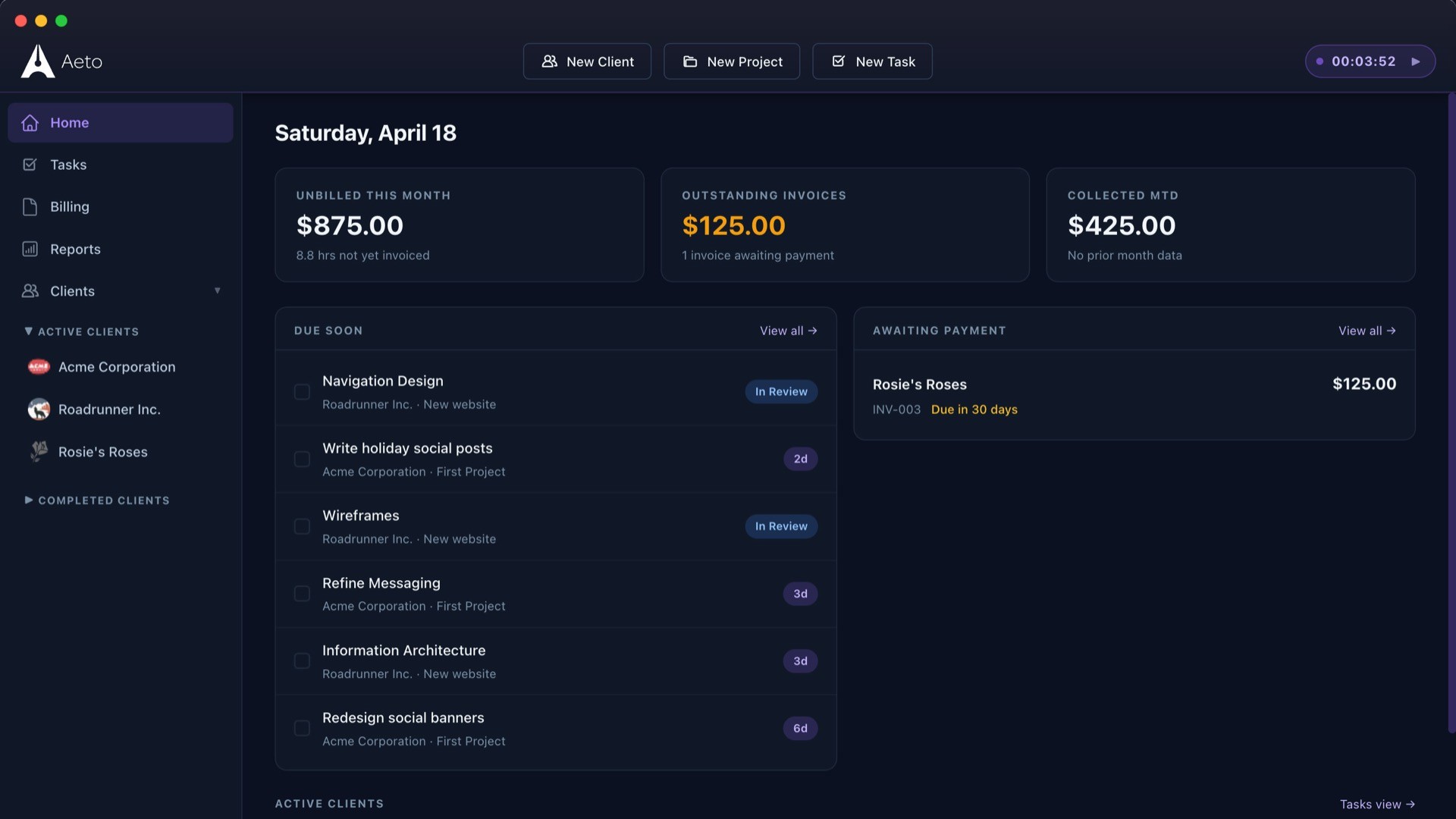
Aeto shows unbilled work in three places: the Home screen, each client page, and the Reports section. The Home screen has a card with a dollar total and the hours behind it. Current versions label that card Ready to Invoice, and it counts finished tasks you haven’t invoiced yet (the screenshot at the top of this post shows the card’s earlier name, Unbilled This Month). Each client page shows Unbilled, Invoiced YTD and Total Paid side by side. The client figure can run higher than the Home screen’s because it also includes time on tasks that are still open. The Unbilled Clients report lists every client with unbilled time, and you can export reports to CSV.
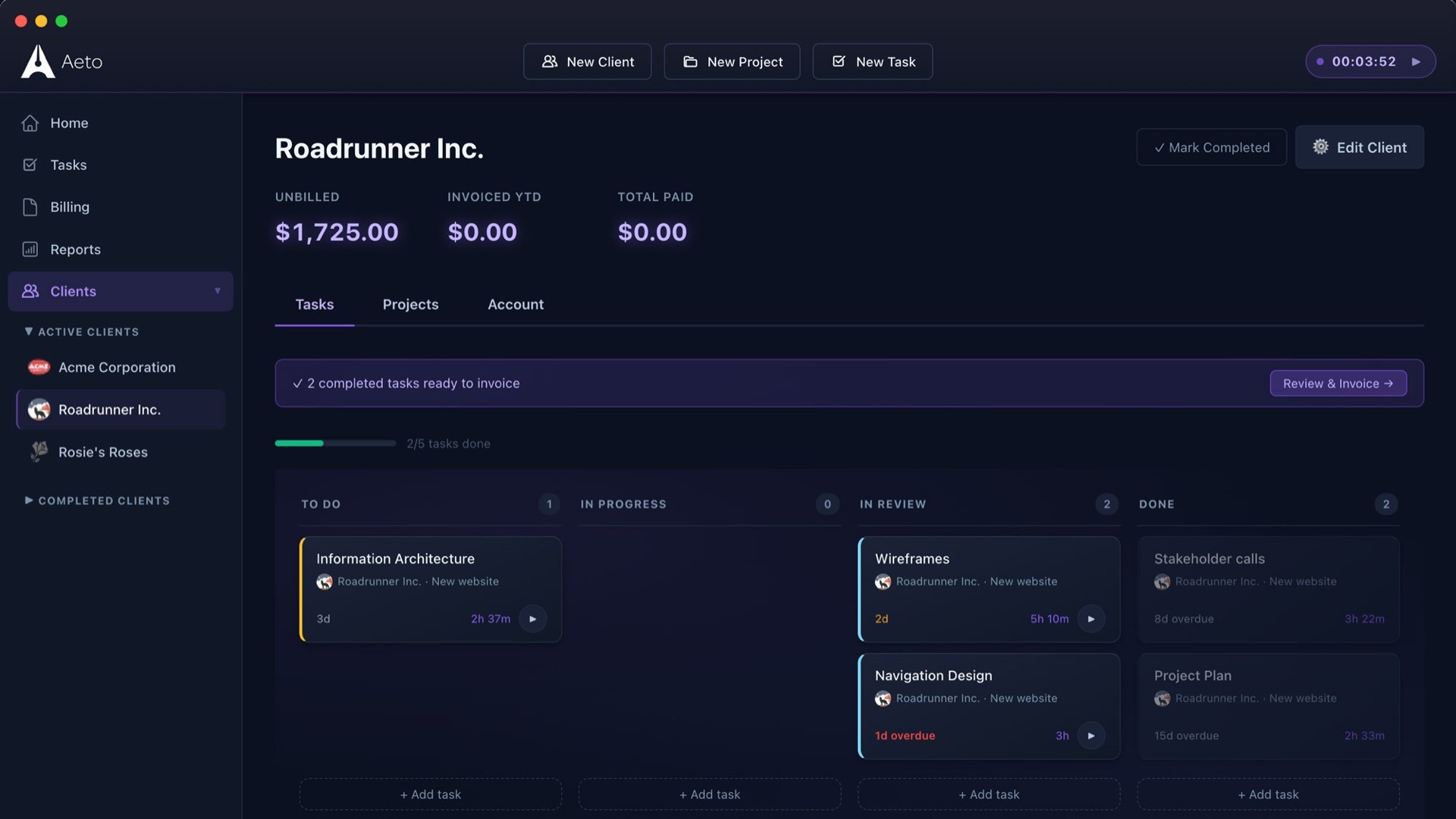
In the Roadrunner example above, the client page shows $1,725.00 unbilled and a banner for two completed tasks ready to invoice. From there, Aeto builds the invoice draft from the finished tasks and tracked time, so you review it and send it yourself. Aeto creates the PDF and doesn’t email invoices for you.
What won’t an unbilled work number tell you?
An unbilled number can’t tell you about work you never tracked. Every tool in this post, Aeto included, counts records, and as far as the software is concerned, a call with no record never happened. That’s the honest limit of this whole approach. The daily check shrinks the gap, because you’re asking the question while you can still answer it, but it can’t close the gap by itself. That’s why a quarterly invoice audit is still worth an hour of your time, even with a good number on your screen.
Aeto has its own limits too. As of November 2026 it has no free plan ($10 a month or $100 a year after a 30-day trial), no team accounts, no proposals or contracts, and no QuickBooks or Xero sync. There’s no native Windows app, so Windows users work in the web app and Chrome Extension. If you need your time data feeding your accounting software, FreshBooks or Harvest may suit you better, and the Aeto vs. Harvest comparison lays out those differences.
I can’t tell you whether checking this number daily will feel useful or a little obsessive in your third month of doing it. Probably a bit of both. But try it for two weeks and write down what step 2 catches. If the list is empty, go back to your monthly routine. If it isn’t, multiply it by your rate, and read why freelancers lose money on unbilled hours with your own number in mind.
Aeto is project management, time tracking and invoicing for solo freelancers, with your unbilled work on the Home screen. Try it free for 30 days, no credit card required.